For cloud, security & governance teams
Turn architecture reviews into confident decisions.
BDATUM brings architecture inputs, cloud signals, control reviews and reports into one traceable workflow. See posture clearly, prioritize the next action and give every stakeholder the evidence behind each decision.
Explore the live demoStep into a ready-to-use workspace and explore the complete workflow in your browser in five minutes.
Versioned controls · human-approved decisions · evidence-linked reports
One shared source of truth
Bring architects, security reviewers and governance teams around a posture they can inspect, explain and act on.
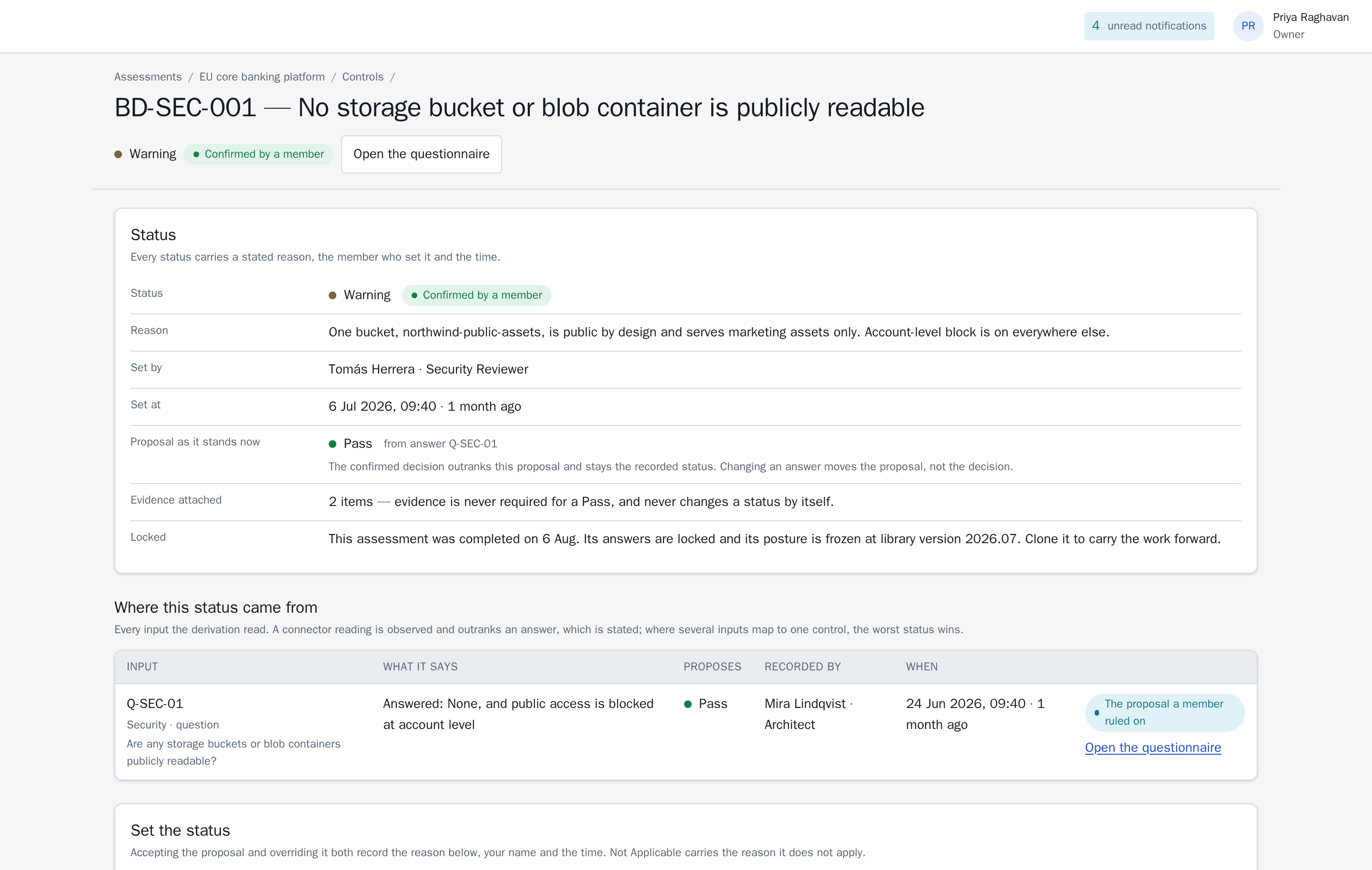
The member who set it
The proposal it outranks
See every decision in context
Open any control to see its current status, reviewer, rationale, source evidence and original proposal—everything your team needs to understand the decision and move it forward.
From architecture inputs to an agreed action plan.
Give every review a repeatable path: build the architecture picture, translate it into review-ready posture, and let the accountable people approve the way forward.
-
Build the architecture picture
Capture business, data, application, technology, security, network, distributed-cloud and governance context through one structured assessment. Add read-only inventory, network, identity and storage configuration when useful.
Review business context and cloud configuration together in one workspace, with every input clearly sourced.
-
Generate review-ready posture
BDATUM maps those inputs to a versioned control library, proposes a status for each control and surfaces the findings that deserve attention.
Each finding carries its source, severity, business impact and recommended next action, ready for a focused review.
-
Approve and act
An authorized architect or security reviewer confirms or updates each proposal. The approved status carries their rationale, identity and timestamp, creating clear ownership for the decision and its next step.
Recommendations, decision records and report passages follow the same review flow, helping teams move quickly while keeping expert judgement visible.
See posture clearly. Focus on what matters next.
The dashboard separates approved control status from proposals still in review and organizes findings by severity. Open any count to move from the portfolio view to the decisions behind it.
Clear control posture
One clear status per control, supported by the reviewer's rationale.
Prioritized findings
Every Fail and Warning becomes an actionable finding with a severity and recommended next step.
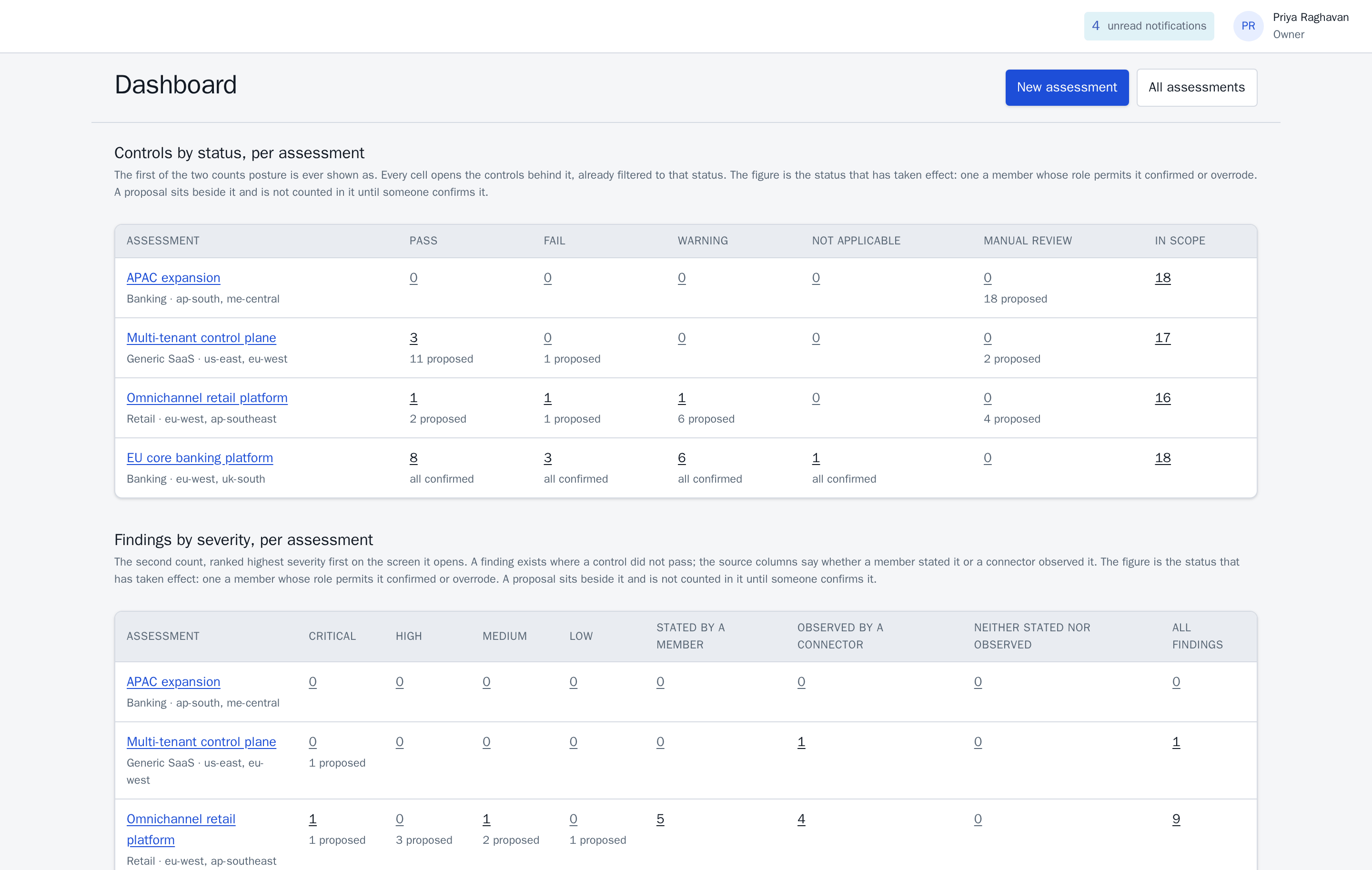
Portfolio posture at a glance
Compare assessments, see review progress and open any count to inspect the controls behind it. Approved decisions and proposals stay clearly separated throughout.
- Understand review progress. See approved posture and proposals still awaiting a decision at a glance.
- Trust every number. Open any count to inspect the controls, findings, rationale and evidence behind it.
- Keep scope visible. Assessment coverage stays alongside posture, giving stakeholders the context to act with confidence.
Give every decision a complete, durable record.
Connect each status to its rationale, source, reviewer and control-library version. Role-based workflows keep ownership clear from assessment through report delivery.
Every decision carries
- Status
- Pass, Fail, Warning, Not Applicable or Manual Review
- Reason
- The reviewer's rationale, including why a control is Not Applicable
- Set by
- The member who approved or updated the proposal
- Set at
- The time it took effect
- Basis
- The answer, connector reading or evidence behind it — and the finding names which
- Against
- The control identifier and the library version it was evaluated against
Re-open an assessment from last year and the controls appear as they were at the version it recorded.
Five roles
- Owner
- Everything, plus billing and workspace deletion
- Admin
- Invites and removes members, assigns roles, manages connectors, reads the audit log, reads assessments and reports
- Architect
- Creates and completes assessments, answers questions, edits evidence, sets control status, generates reports
- Security Reviewer
- Reviews assessments, sets control status and adds review comments while architects retain ownership of source answers
- Read-only
- Views assessments and reports for informed stakeholder access
Every object belongs to exactly one workspace and is invisible outside it. The region is fixed at creation; uploaded evidence files are stored there.
Six decision-ready reports, grounded in their inputs
| Report | Contains |
|---|---|
| Executive Summary | Posture counts, top findings by severity, architecture gaps, distributed cloud readiness, regulatory readiness, business impact, recommended next steps |
| Technical Findings | Every finding: control, status, affected area, severity, evidence, remediation, owner |
| Architecture Blueprint | Target-state architecture for the track: zones, identity model, security controls, DR pattern, distributed cloud placement |
| DCC Readiness | Regional footprint, residency matrix, connectivity model, resilience gaps, observability readiness |
| GRC Mapping | Control-to-framework mapping, evidence summary, Manual Review items, exceptions, regional notes |
| Remediation Roadmap | Findings ordered into quick wins, medium-term fixes and structural changes, each with severity and impact |
Reports stay connected to the current assessment, so posture, citations and scope remain current whenever a report is opened. PDF and DOCX exports preserve that content as a dated snapshot, with format, author and stated posture recorded in the audit log.
Know the coverage behind every conclusion.
BDATUM makes review coverage easy to see. Connector access, questions needing input and assessment scope appear alongside posture, giving every conclusion the context it deserves.
Connector coverage
See the reader identity, permissions and latest scan status for each connected account. Access items that need attention are surfaced with enough detail for the owner to resolve them.
Successful readings drive proposals; coverage items stay visible as part of the review plan.
Review completeness
Every answer and intentional skip carries an author and time. Questions that need expert input become visible Manual Review items with clear ownership.
The dashboard keeps this work beside approved posture so teams can plan the next review efficiently.
Transparent report scope
Every report states the assessment coverage behind it and highlights the inputs still in progress, helping readers use each conclusion appropriately.
Current tier limits and reset dates are shown in context, making capacity and follow-up planning straightforward.
Keep the decision trail useful over time.
Evidence evolves. BDATUM preserves the context behind each architecture decision, giving future reviews and audits a dependable history to work from.
Evidence with lasting context
Add a note, a regionally stored file or an external link. Each evidence item carries its author, timestamp and relationship to the controls and findings it supports.
Retention rules manage the file lifecycle while the evidence record preserves its filename, content hash, history and citations. Reports therefore retain a resolvable trail long after the original review.
An audit trail built into the workflow
The workspace log captures sign-ins, role changes, assessment milestones, status and evidence updates, connector activity, report generation and exports. Each event names its actor and time.
This append-only history gives Owners and Admins a dependable sequence of decisions, including durable records for member departures, evidence lifecycle events and workspace closure.
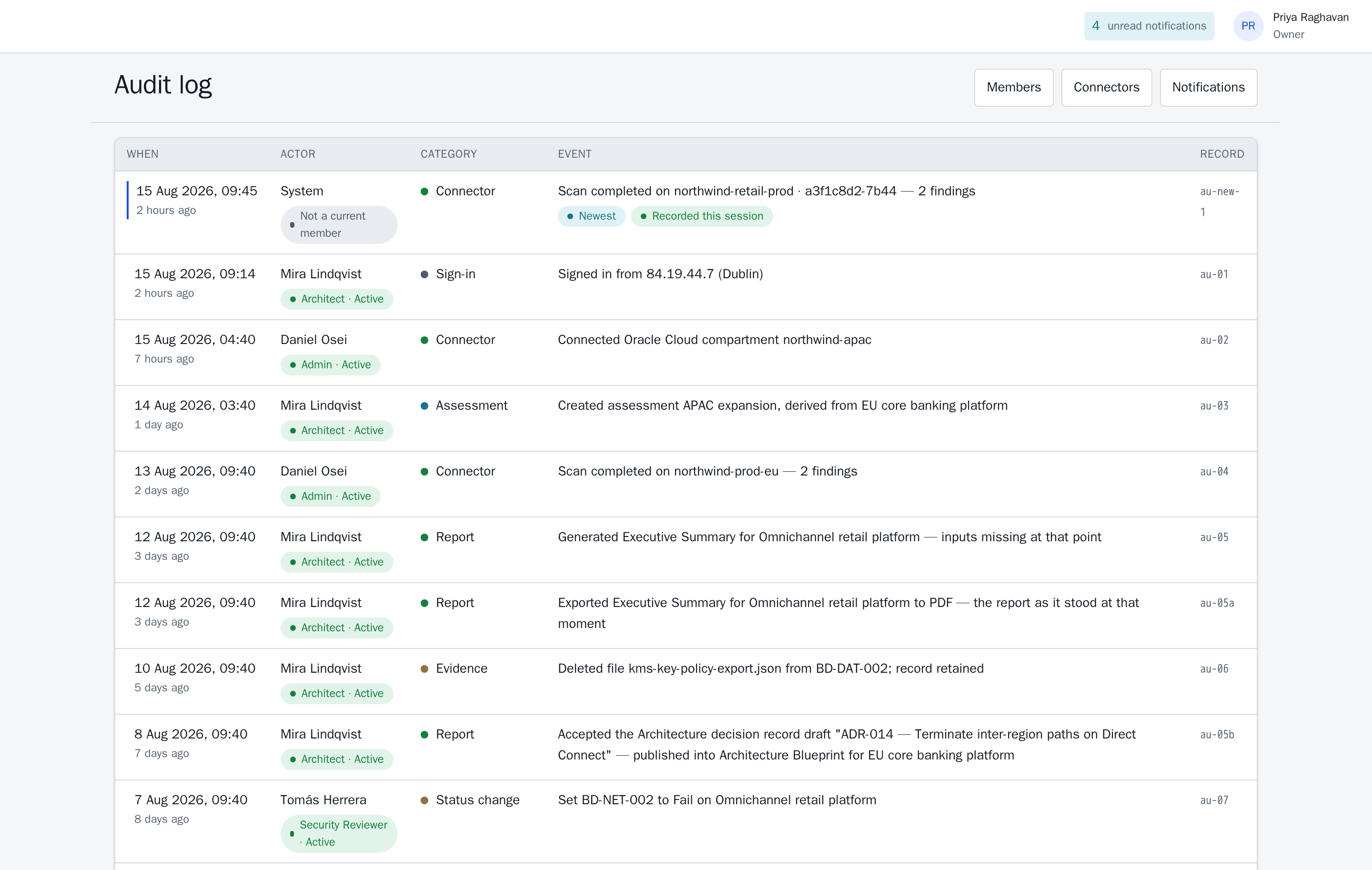
Accountability stays with the event
Each entry continues to identify the original actor, keeping the decision history understandable as team membership changes.
Evidence history stays resolvable
Lifecycle events retain the filename, related control, actor and timestamp, preserving useful context for future review.
Assess architecture in its business and regional context.
Start with a Banking, Retail or Generic SaaS track and choose the relevant regions. BDATUM applies that context consistently while preserving each assessment at its recorded library version.
Framework-aligned control mapping
Use framework mappings to organize relevant controls and the evidence that supports them. The resulting reports help qualified teams prepare for compliance reviews, audits and certification work with clear, traceable inputs.
Regional packs
- EU West (Ireland) — GDPR + DORA
- UK South (London) — UK GDPR + FCA
- US East (Virginia) — SOC 2 + state privacy
- AP Southeast (Singapore) — MAS TRM + PDPA
- AP South (Mumbai) — RBI + DPDP
- ME Central (Dubai) — SAMA + UAE DPL
Selected regions tailor the framework mapping and residency prompts to the architecture under review.
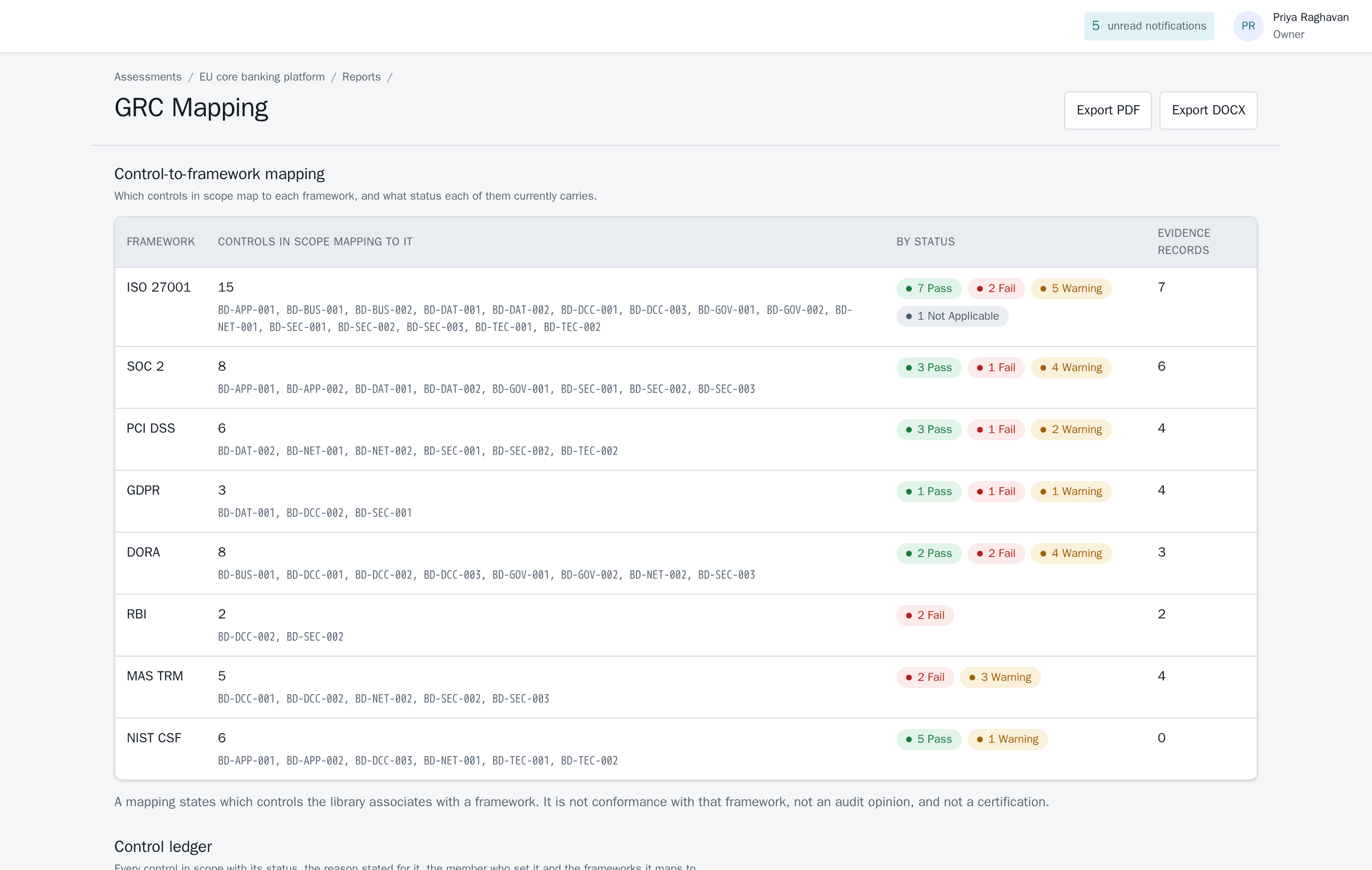
Framework context, ready to review
See the controls mapped to each framework, their current status and the supporting evidence count—organized for a faster, more productive governance conversation.
Designed for expert-led governance
Give decision-makers evidence they can trace, context they can trust and a clear next action.
BDATUM supports architecture governance and compliance evidence preparation while qualified teams retain the final regulatory, audit and certification judgement. That partnership keeps every decision useful, transparent and accountable.
Explore a complete architecture review in five minutes.
The live demo is ready with realistic assessments, findings, evidence and reports.
- Start on the dashboard and choose an assessment.
- Open a posture count to see the controls and findings behind it.
- Review one control's status, rationale, owner, source and evidence.
- Follow that evidence into a report citation and see how the context travels with it.
- Finish in the audit log to see the complete decision trail by actor and time.
Open the seeded workspace instantly in your browser. It is designed to show the full workflow and resets after your session.